
My Lenovo Thinkpad X40 Netbook review
Saturday 23 August 2008, by , 20864 Views
Rate this articleAll the versions of this article: [English] [français]
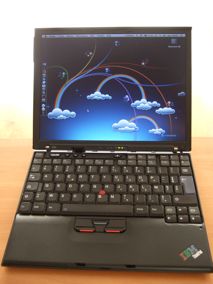
Since April I have waited for Asus and MSI netbooks. The laptops I wanted were delayed several times in France so I gave up and bought a second hand Lenovo Thinkpad X40 which I modded quite a bit.
This article is a translation of my French Lenovo Thinkpad X40 review
The Thinkpad X40
The Thinkpad X40 is an ultra-light laptop from Lenovo (formerly IBM). Main specifications are similar to the second generation Netbooks , with the 4-cell battery, it weights 2.7 lb, that’s about the same as the MSI Wind but it has a 12 inches screen, far better than most netbooks, and also have a Pentium Dothan 1.4 Ghz processor faster than Celerons or Atoms from the former.
When it was released the reviews were very good but it was very expensive at around 2200 US dollars.
I have bought a second-hand X40 at Ebay for 320 euros including the ultrabase DVD station.

Keyboard and trackpoint are excellent as always on IBM thinkpads
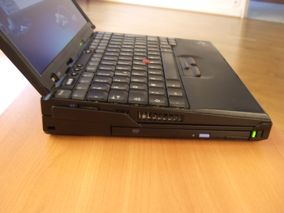

The DVD ultrabase design is very good and adds a little to the laptop height

It also adds lots of interfaces: PS2, 3 USB, Ethernet, VGA, modem, parallel, serial

The thinlight lights the keyboard in the dark, as the keyboard is not backlit
In France (french model needed for Azerty french keyboard), almost all second-hand Thinkpad X40 on Ebay comes from PSA (Peugeot, a french car maker) and were used by their marketing people. The laptops are often mint, the screens have patches, their backlight is reduced, and there are often lots of scratches on the laptop body (not that it matters that much because Thinkpad are sturdy).

PSA anti-theft tatoo is still there, I guess with my luck they’ll think I have stolen it 8-), fortunately I have an invoice
You have to test them throroughly, because on the two laptops I considered, wifi didn’t work on the one with the better TFT screen (I planned anyway to change the wifi card - however I didn’t take the risk because the problem might come from the mini-pci port or the wifi antennas).
It was the first time I have bought an ultra-light which was not new, and I think it is the last time because if it has been really used it’s too risky (the screen replacement costed me more than 200 euros - see below).
The main Netbooks I considered were Asus EEE PC 901 (with Atom processor), MSI Wind, perhaps ACER Aspire One which arrived later. The following table compares quickly those netbooks with the Thinkpad X40:
| Spec | IBM X40 | EEEPC 701 | EEEPC 901 | MSI Wind | Acer Aspire | IBM X40 modded | Note |
|---|---|---|---|---|---|---|---|
| Weight | 2.7 lb | 2 lb | 2.4 lb | 2.6 lb | 2 lb | 3.2 lb | (a),(b) |
| Width | 10.5 in | 8.86 in | 8.86 in | 10.2 in | 9.8 in | 10.5 in | (a) |
| Depth | 8.3 in | 6.46 in | 6.9 in | 7.1 in | 6.7 in | 8.3 in | (a),(b) |
| Height | 1.06 in | 1.4 in | 1.5 in | 1.24 in | 1.14 in | 1.06 in | (a) |
| Screen | 12.1 in | 7 in | 8.9 in | 10.2 in | 8.9 in | 12.1 in | (c) |
| Resolution | 1024x768 mat | 800x480 mat | 1024x600 mat | 1024x600 mat | 1024x600 glossy | 1024x768 mat | (c) |
| Processor | Pentium M Dothan 1.4 Ghz | Celeron M 630 Mhz | Atom 1.6 Ghz | Atom 1.6 Ghz | Atom 1.6 Ghz | Pentium Dothan M 1.4 Ghz | |
| Memory | 512 mo ext. 1.5 Go | 512 mo. ext. 2 Go | 1 go ext. 2 Go | 1 go ext. 2 Go | 512 mo ext. 1.5 Go | 1 Go | |
| Hard disk | 40 Go Hitachi 1.8 | SSD 4 Go | SSD 4 Go + 16 Go | 80 Go 2.5 | SSD 8go | SSD CF Transcend 8 Go | (d) |
| Graphics | Intel 855GM | Intel GMA 900 | GMA 950 | GMA 950 | GMA 950 | 855 GM | |
| Wifi | Intel 2200g | Atheros AR5007EG g | Azurewave RT2700E n | Realtek RTL8187SE g | Atheros AR5BXB63 g | Broadcom BCM4318 | (e) |
| Ethernet | Intel Gb | Atheros AR8216 | Atheros AR81xx | Realtek RTL8101E Gb | Realtek RTL8101E Gb | Intel Gb | |
| Mouse | Trackpoint | Trackpad | Trackpad | Trackpad | Trackpad | Trackpoint | |
| Camera | non | 0.3 mpix | 1.3 mpix | 1.3 mpix | 0.3 mpix | 0.3 mpix | non |
| Bluetooth | no | no | yes | yes | no | yes | (f) |
| Infrared | yes | no | no | no | no | yes | |
| Card reader | SD | SDHC | SDHC | SDHC | SDHC | SD | |
| PC Card | yes | no | no | no | no | yes | |
| Battery Life | 1h30 | 3h | 4h | 3h | 2h | 4h30 | (b) |
| Price in euros | 320 euros (occ.) | 249 euros | 399 euros | 399 euros | 299 euros | 741 euros | (g) |
(a) Size


Thinkpad X40 size is about the same as a magazine or an open DVD box. It’s slighty longer with long life battery fitted.

My Wetsuit 2.0 bag, bought in 1995 for my Olivetti Echos 20 ultra-light, still fits. That bag allows me to use the laptop without removing it from the bag.
(b) Long Life battery

8-cell long life battery
Long life battery extends battery life from 1h30 (used battery which came with the X40) up to 4h30 or even more.

The laptop is 0.5 lb heavier and it adds 1inch to the laptop length with long life battery. I still often use the old battery to carry a lighter laptop, I might buy a new one to have a better battery life.
I have also bought an ultra-light power supply on Ebay really lighter than Lenovo’s.

On the photo it is not obvious, but the power supply below is actually lighter and has a two-pronged power cable with is really lighter than the 3-pronged one
(c) 12.1 inches screen
The main issue with second hand laptop, is that the screen has been used a lot. On my X40 there were lighter patches on the screen, and even some hair between the LCD and the glass display (I wonder how they did it! I guess it was a defect at build time).


The new screen wrapped
I had to buy on Ebay a new X40 compatible screen it was pretty expensive, about 160 euros plus 40 customs tax, which added to 200 euros around the price of a new EEE PC 701.

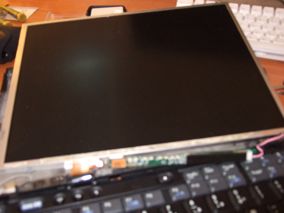
It’s not easy to replace the screen, it’s better to download the Thinkpad X40 Hardware maintenance manual to understand how to replace the screen.
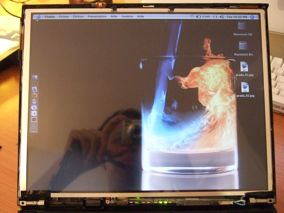
The new screen works ok but it displays less colors than the original and backlight is not strong for a new screen (I took the cheapest on Ebay).

Note: I have also bought a 3M screen protection from Vikuiti, but I wasted 36 euros because I couldn’t put it in place without some speck of dust on the screen, on the wrong side which stick to the laptop: I guess you should do it in a sterile environment, and when there are some speck of dust you can’t do much anymore (I had lots of air bubbles too).
(d) SSD Transcend 8 Go

Original 1.8 inches Hitachi hard disk
The Thinkpad X40 hard disk is pretty bad, it’s a 1.8 inches model, not common and very expensive. It has a capacity of 40 or 60 Go. It’s not that slow but is very noisy.

I bought Addonics Dual CF-IDE HDD Adapter - part number AD44MIDE2CF which allows to use two (!) compact flash as master and slave IDE hard disks (raid might be possible ;-) ) and I followed this web page instructions and this forum hints
Store Webconnexxion is the only one I found which delivers the card to Europe.
Note : I have also bought another adapter on Ebayy far cheaper which works ok (but has only one compact flash slot).

All these adapters can also replace a 2.5 inches PATA hard disk (tested ok on an external 2.5 inches PATA USB box).
For the compact flash, I picked Transcend 300X 8 Go at Esoph for around 89 euros, I was sure it would be recognized as a fixed disk (unlike Lexar 300x which is common too), which certainly helped when I installed Mac OSX Leopard.


The thinkpad is very fast under MacOSX with this compact flash: it boots in 10 s and shutdown in 1s, everything is instantaneous with little noise.
The only minus is that battery life has not improved, and perhaps has even decreased because unlike the 1.8 inches hard disk, the compact flash SSD is always on - when you surf the internet it might decrease battery life compared with what you got with the Hitachi hard disk.
Note: putting the adapter and compact flash in place was very hard because putting blindly adapter 40 pins and making sure it connects was impossible (100 trys only one ok). In the end I had to remove part of the laptop case to see better and perform the operation
(e) Wifi Broadcom card

The built-in Wifi Intel 2200 B/G
The built-in Intel 2200 B/G wifi card works badly with Mac OSX (no encrypted wifi possible).

I had to replace it with a broadcom 4318 card, natively supported by Macosx (or almost). Beware, you have to buy a Mini-PCI Type IIIB card and not a Mini PCI Express card which are in all new laptops like the EEE PC.


The Thinkpad X40 bios forbids (!) the use of unauthorized wifi cards, it must be patched with no-1802 program on CD or floppy disk. It might be better NOT to update the bios in case the new version doesn’t allow the patch anymore.


(f) Bluetooth BMDC-2 card


My thinkpad X40 didn’t have built-in bluetooth. I have bought on Ebay the modem + Bluetooth card and replaced the built-in modem card: it works perfectly, the keyboard shortcut FN + Wifi can turn on and off the bluetooth.
Replacing the screen was difficult, and I didn’t have the heart to do it again to install a bluetooth antenna: so I have used the following bluetooth mini-antenna bluetooth from the same Ebayer.


Note: It is easier to buy a mini bluetooth USB dongle which works also perfectly, but I like better the built-in solution (well I had fun trying it anyway).

(g) Total price
All considered, it was pretty expensive
| Hardware | Euros | USD | Note |
| Second-hand Thinkpad X40 | 320 euros | 480 USD | with Ultrabase 4X DVD station |
| 8-cell battery | 36 euros | 54 USD | |
| Ultra light power supply | 25 euros | 38 USD | |
| 12.1 inches screen | 200 euros | 300 USD | |
| Addonics AD44MIDE2CF | 36 euros | 54 USD | |
| Transcend 300X 8 Go Compact flash | 89 euros | 135 USD | |
| Mini-PCI Broadcom 4318 card | 15 euros | 23 USD | |
| Bluetooth BMDC-2 card | 15 euros | 23 USD | |
| Bluetooth Mini-antenna | 5 euros | 8 USD | |
| Total | 741 euros | 1110 USD |
This is without taking into account lost euros on screen protection, wrong mini-pci card (about 50 euros more).
Summary
For that price I could have bought a second-hand Macbook which would have been heavier (2,2 kg), a new fire sale Thinkpad X60, heavier and with problems if I wanted a SSD or a Thinkpad X41 tablet with touchscreen, but also with problems with Wifi card and SSD replacement.
But whatever, I had lots of fun modding this laptop and even more making Mac OSX Leopard work on it.

Thinkpad X40 under MacOSX Leopard 10.5.2
After all that, I have a netbook slightly larger than others but with more screen estate (12 inches), a better keyboard and trackpoint, well built (IBM), still light enough (2.7 lb to 3.2 lb) and with enough battery life (up to 5 hours), fast, quiet (with compact flash SSD and Mac OSX Leopard). I guess it the perfect netbook for that size, one could only consider the Asus 900A as alternative because it has a significantly smaller footprint.
I did a webpage on all my ultra-light laptops since 1995 (in french) which can put this in perspective, the X40 is not the lightest or smallest by far even when it has been more than 12 years since my first Olivetti Echos 20 ultra-light laptop.
Useful Links

MacOSX on Thinkpad X40 (french) Installation of Mac OSX on Thinkpad X40
My ultra-light laptops from 1995 to 2008 (french) An history of my netbooks since 1995
Blogeee (french) Blog on netbooks
Antharius (french) Blog on netbooks
Jkkmobile Blog on netbooks
General information on Thinkpad X40
Thinkpad X40 detailed Lenovo specifications
Forum Hardware.fr French Forum on ultra-light laptops - topic X40
Thinkpad X40 Hardware maintenance manual A must to mod the laptop
Tests du Thinkpad X40
Notebook Forums X40 review Thinkpad X40 User review
Cnet X40 review Other Thinkpad X40 review from CNet
Batterie et autres
IBM X40 long life battery on Ebay at least 4h instead of 2h
IBM X40 ultra-light power supply on Ebay
TFT Screen
12 pouces Thinkpad X40 screen on Ebay
See Thinkpad X40 Hardware maintenance manual to replace the screen
Compact flash SSD
Compact Flash Transcend 300X Cheapest I found at Esoph
Addonics dual IDE CF Adapter at Webconnexxion Only store delivering in Europe
Cheap CF adapter on ebay Works ok but with only one compact flash slot
Thinkwiki Compact Flash boot drive
X40 on Compact Flash SSD Another user which switched his hard drive to a compact flash SSD
Thinkpad X40 SSD forum Lots of useful information on SSD on a Thinkpad X40
Addonics CF adapter Manufacturer web site
Wifi card
Wifi Broadcom 4306 Mini-PCI card on ebay
Thinkwiki unauthorized Mini-PCI Wifi cards
Thinkpad 1802 Error fix This web page has the programs to work around this error on unauthorized wifi cards
Thinkpad unauthorized Mini-PCI Wifi cards Some information, another way to go around the problem with changing the ID of the mini-pci card on another laptop ...
Bluetooth
Thinkpad X40 Bluetooth + modem card on ebay
Bluetooth Mini-antenna on ebay Evite l’installation d’une antenne ordinaire (qui s’installe sur les cotés de l’écran)
7 Forum posts
Any message or comments?
Sections

Also in this section
- Fuji Real 3D W3 Camera Test
- Archos 5 IT Test
- Archos 7 Home Tablet Test
- MacOSX Snow Leopard on Packard Bell iMax C2600 / Aspire Revo R3600
- Nokia N900 versus iPhone 3G quick test
- Windows Seven on an 2005 AMD Sempron 3000+
- From Nokia E90 to Apple iPhone 3G 16 Go
- Fuji F70EXR Review
- Yet another MacOSX EEEPC installation
- Fuji Finepix F200EXR Review: first impressions
